How it works
Multiplayer is a debugging agent that sits between your production runtime and your coding agent. It watches for errors and exceptions, gathers the data needed to understand them, and hands a curated version of that data to the coding agent you already work with, so it can produce an accurate fix.
It's not another dashboard, and it's not a chatbot layered on top of your existing observability tool. It's a companion tool to your coding agents, which manages the whole process from bug identified to bug fixed: data gathering, intelligent triage and issue deduplication, coding agent prompting, PR creation and user notification.
TL;DR
- Multiplayer runs locally, next to whichever coding agent you already use (Claude Code,Codex, Copilot, and Cursor).
- When something breaks, Multiplayer captures the full session, correlates it across your stack, and decides whether it's worth fixing automatically.
- If it is, your coding agent gets a curated package of data, not unsampled telemetry, and opens a PR.
- If it isn't, a human gets flagged instead of a low-quality fix getting shipped.
- You review and merge like you would any other PR.
See the Open Source page for more information.
The developer workflow
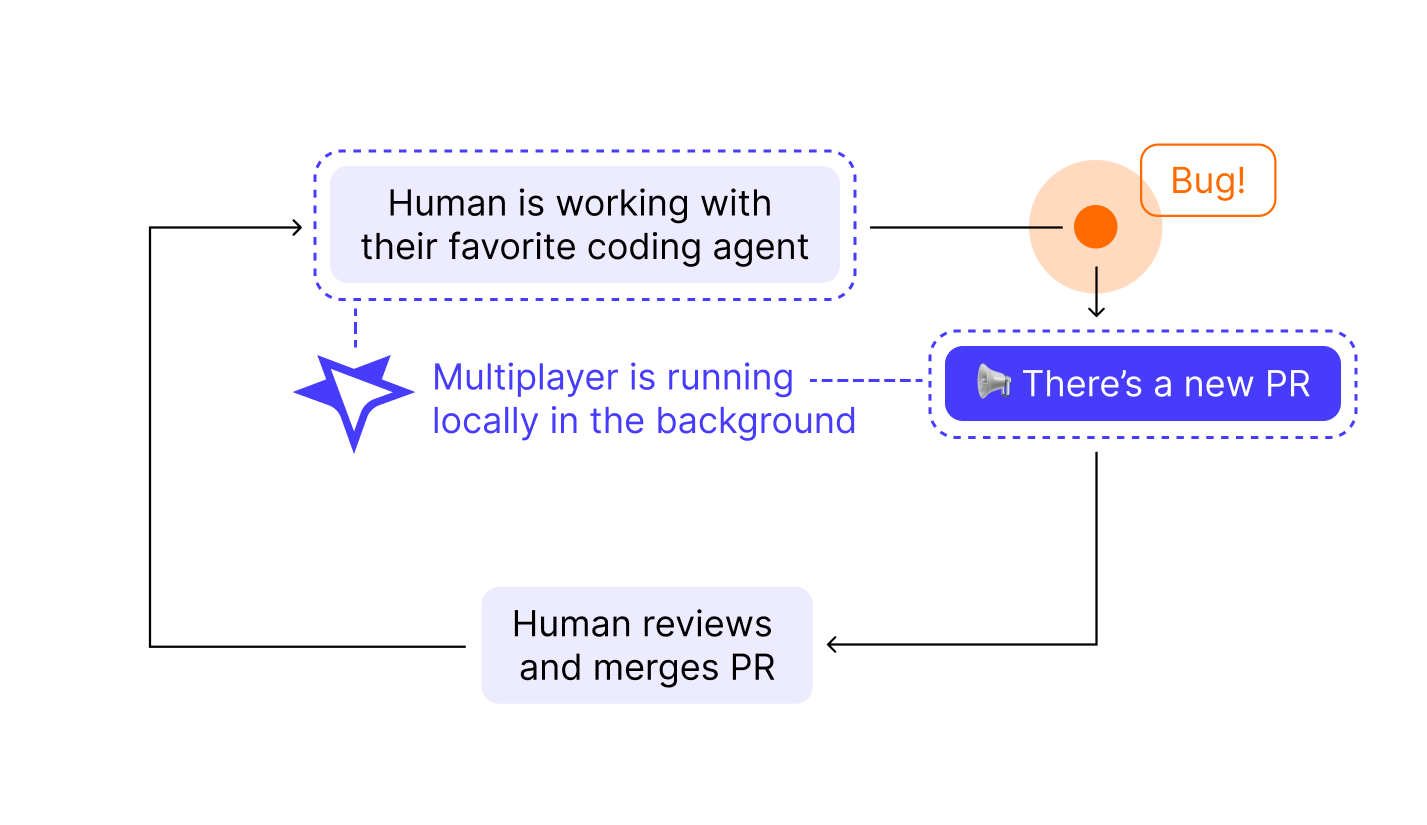
Multiplayer adds one thing to your existing workflow: high-quality, merge-ready PRs. Everything else stays the same.
- You work with your coding agent as usual, writing and shipping code.
- Multiplayer runs locally in the background, watching for errors and exceptions.
- When a bug occurs, Multiplayer decides whether it's worth an automated fix. If yes, a PR shows up in your queue.
- You review and merge the PR like any other.
What happens in the background
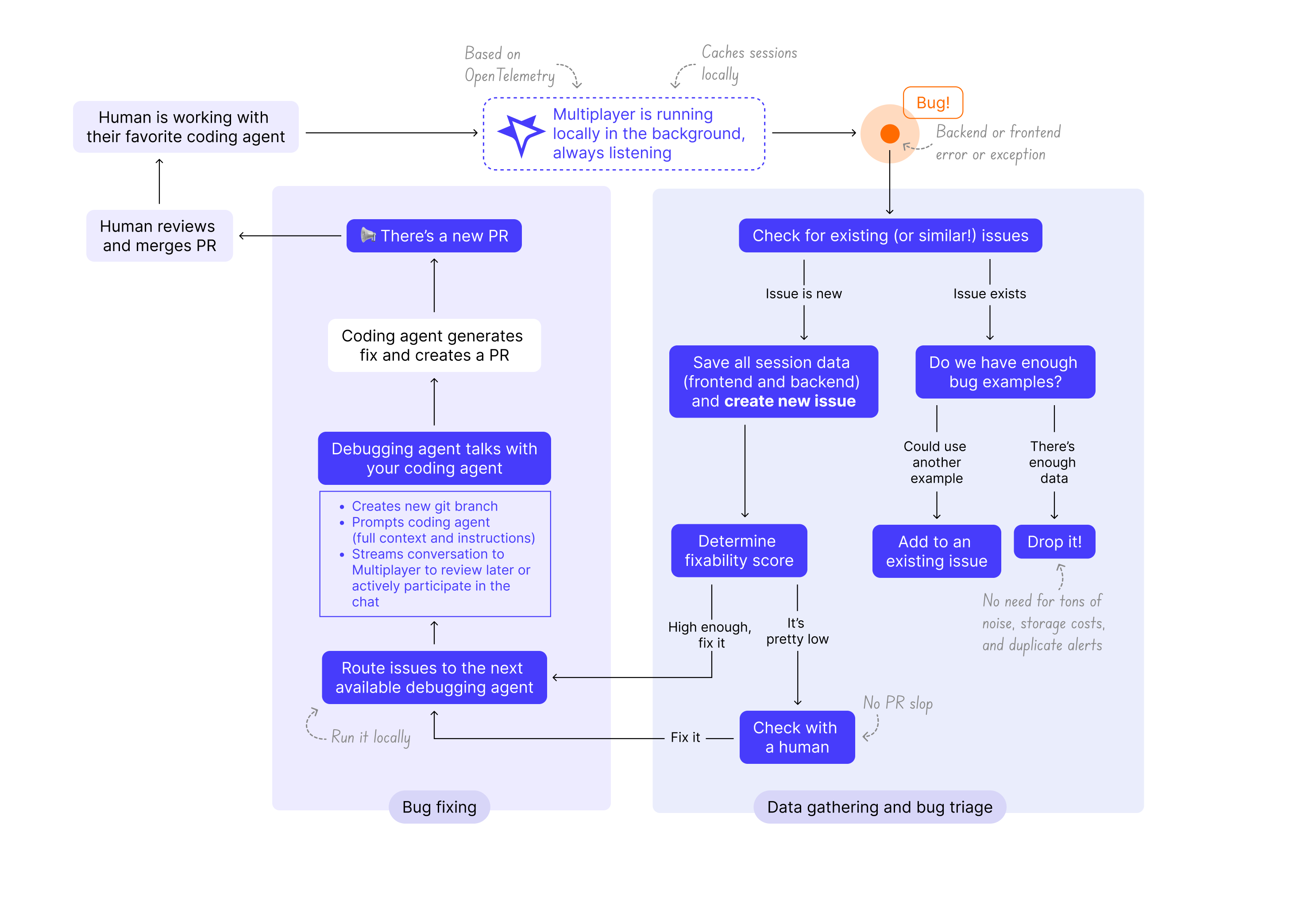
- An error happens
- Multiplayer captures the session data and correlates it across frontend and backend > it becomes a recording
- Multiplayer checks it against existing issues and creates or updates one
- The issue gets triaged and scored for fixability, if it clears the bar, an agent picks it up and prompts your coding agent
- Your coding agent opens a PR.
Key concepts
- Recordings are the raw captured sessions, frontend and backend, correlated into a single timeline.
- Issues are what recordings turn into once Multiplayer has grouped and deduplicated them. One issue can include multiple recordings of the same bug.
- Agents are the workers that pick up a fixable issue, talk to your coding agent, and carry it through to a PR.
Steps
Everything between "a bug occurred" and "here's a PR" happens in two phases:
Data gathering and bug triage
- New error or exception: Multiplayer saves the full, unsampled session data as a recording, correlating data across frontend and backend.
- New issue: Multiplayer checks whether a similar error or exception has already been saved, and, if not, opens a new issue.
- Existing issue: if an issue with a similar error or exception exists, Multiplayer checks if there are enough recordings of it. Not enough recordings, add the recording to the issue and stop. Enough recordings, move on and drop the new recording.
- Fixability score: Every issue gets a fixability score. High enough, route it to an agent. Too low, flag it for a human.
Bug fixing
- A Multiplayer agent picks up the issue: creates a git branch, prompts your coding agent with full context, and streams the conversation back to Multiplayer, so you (or your team) can review it later or jump in live.
- Your coding agent produces the fix and opens the PR. You review it and merge it.
Why data curation matters
APM and observability data is built for a person reading a dashboard, not a model reasoning about a failure. Three properties make it unusable for a coding agent as-is:
- Volume without ranking. A single production issue can span hundreds of spans, thousands of log lines, and events across a dozen services. A model given that feed weights all of it equally, so it can't tell what actually matters.
- No correlation across boundaries. APM tools capture traces, logs, and metrics as separate streams. Tying a frontend click to the backend exception it caused takes manual cross-referencing and, often, team tribal knowledge.
- No fixability signal. Observability tools report that something happened, not whether it's the kind of failure a model can safely fix or whether the agent (or a teammate's agent) already produced a PR on that same problem.
Curating the data before it reaches a coding agent means doing four things:
- Correlate and deduplicate. Tie user actions, network requests, and unsampled backend traces into one timeline. The same bug reported a hundred times becomes one issue, one prompt.
- Score for fixability. Route deterministic, reproducible failures to the coding agent. Route intermittent or environment-specific ones to a human, since that's where a coding agent's error rate is highest.
- Attach release context. Include the build, recent commits, and service versions involved, so the fix addresses what changed.
- Format for a model, not a dashboard. Restructure nested JSON and raw log lines into a linear account of what happened, the way you'd brief a teammate joining an incident partway through.
Skip any of these four steps and a coding agent given raw telemetry spends most of its tokens sorting signal from noise, then produces a fix scoped to the wrong slice of data. For more detail on how each stage works in practice, see How to curate observability data for AI agents.
Related reading
- How to curate observability data for AI agents
- The death of the dashboard: why agentic AI is choking on legacy observability tools
- The debugging agent for developers
Next steps
🚀 If you’re ready to trial Multiplayer with your own app, you can follow the steps in the quickstart.
📌 If you have any questions or want to report bugs please open a GitHub issue! 💜