Guide
Application Architecture Diagram: Tutorial & Examples
Table of Contents
An application architecture diagram is a powerful tool that visually represents the structure and components of a software system. It plays a critical role in guiding development teams, helping them understand how different parts of an application interact and how data flows through the system. By clearly illustrating the application’s architecture, these diagrams facilitate better decision-making, optimize resource allocation, and ensure alignment with business goals.
In this article, we explore various types of application architectures, discuss their characteristics and tradeoffs, share examples and best practices for representing them effectively in diagrams, and introduce a tool with a freemium tier that can be used to create such diagrams.
Summary of diagrams by type of application architecture
The table below summarizes the architecture types and best practices explored in this article.
| Architecture type | Description |
|---|---|
| Cloud architecture | Applications hosted and managed on the cloud leverage resources managed by third-party providers like AWS, Azure, or Google Cloud. Cloud architectures can be deployed using public, private, and hybrid models. |
| Onsite architecture | Applications hosted and managed on-premises leverage on-premises servers, networks, and storage managed and maintained by in-house talent. This offers a greater level of control when compared with cloud-based architectures. |
| Hybrid architecture | A combination of cloud and onsite resources allows organizations to leverage the benefits of each type of infrastructure. This approach offers flexibility and opportunities for optimization but can be complex to manage and integrate. |
Cloud architecture
Cloud architecture describes the design and implementation of cloud-based systems. Building a cloud architecture involves selecting the appropriate providers, components, and technologies needed to create a scalable, reliable, and secure infrastructure.
Cloud deployment models
Cloud deployment models define how cloud infrastructure and services are set up, managed, and accessed by users. These models differ in terms of ownership, control, and scalability.


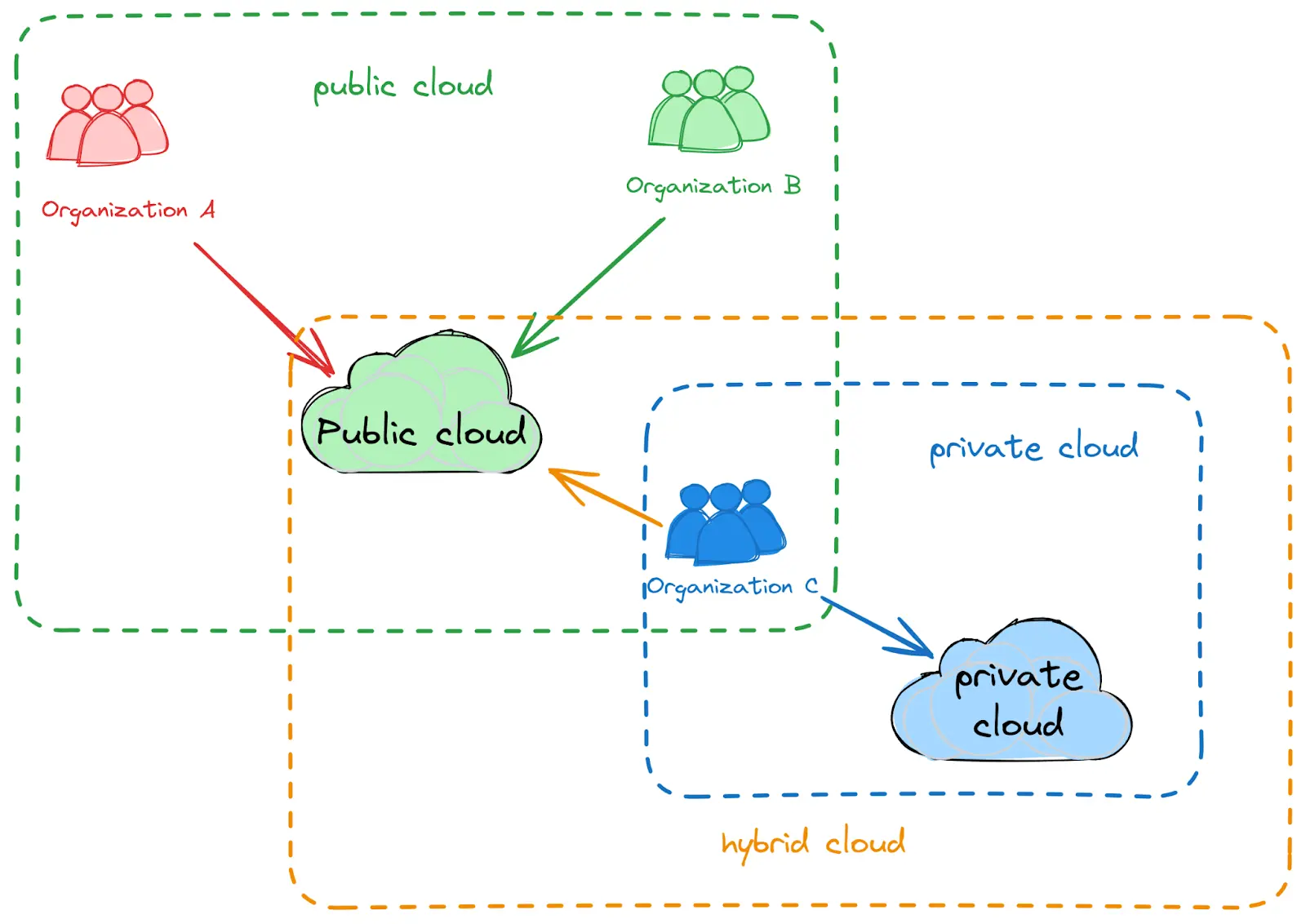
Public, private, and hybrid cloud models
The graphic above shows three different types of cloud deployment models:
- Public clouds: Shared infrastructure owned and operated by third-party providers
- Private clouds: Dedicated infrastructure that can be hosted on-premises or via a third-party provider and is used exclusively by a single organization
- Hybrid clouds: A combination of public and private clouds, offering flexibility and control
Each deployment model has advantages and disadvantages in terms of cost, operational control, security, and regulatory compliance. Because of this, the best choice for an organization depends on that business’ specific needs and priorities. For example, businesses that handle less sensitive data with fewer regulatory compliance needs may opt for a public cloud model, while businesses with strict compliance and security requirements—such as healthcare, finance, or government entities—may choose (or be required) to utilize a private cloud.
Application architecture diagram example
When diagramming a cloud architecture, be sure that labels clearly indicate the cloud provider and function of each service. Group related services together and use arrows to show data flow, dependencies, and interactions.


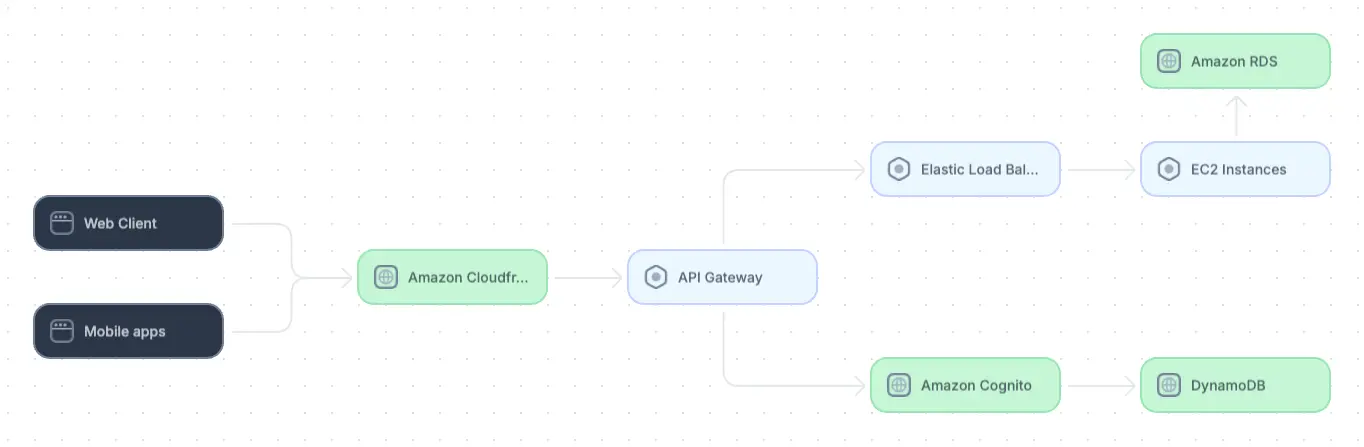
Example cloud architecture diagram
Onsite architecture
Traditional on-premises infrastructure refers to computing resources that are physically located within an organization’s facilities. This model involves owning and managing servers, networks, storage systems, and potentially data centers.
Full-stack session recording
Learn more






Implementing an onsite architecture involves several important steps, including:
- Renting or purchasing hardware and software components
- Designing and deploying network infrastructure
- Configuring data storage and backup systems
- Installing security measures such as firewalls, intrusion detection/prevention systems, access controls, and encryption
- If necessary, deploying load balancers, switches, routers, and other components to improve scalability
- Setting up monitoring systems and planning for hardware and software maintenance down the line
- Conducting performance testing to ensure that the system is responsive and scalable enough to meet business needs
Application architecture diagram example
Because onsite architectures require greater knowledge of physical components, it is important that each component be represented clearly in the diagram. Label components like switches, routers, firewalls, servers, and LAN connections and show their functions clearly. As with other architecture diagrams, show data flow and component interactions using arrows.


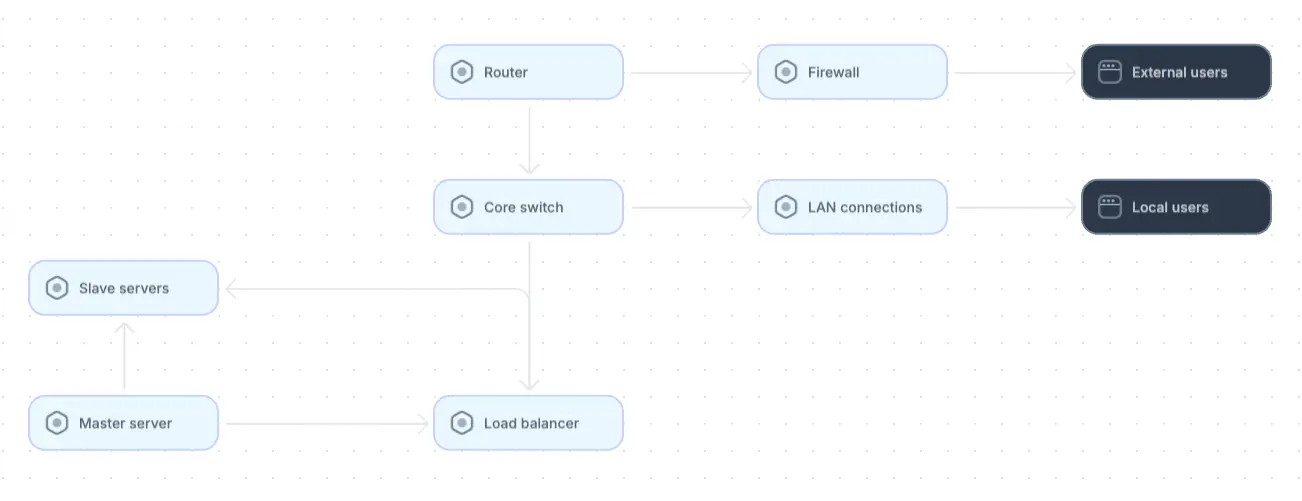
Example of an onsite architecture diagram
Cloud vs. onsite architectures
The choice between onsite and cloud infrastructure is often influenced by assumptions that cloud solutions offer certain benefits over on-premises solutions, such as infinite and more cost-effective scalability, simplified maintenance, and overall cost savings. While these advantages hold true in some scenarios, they are not universal, and certain organizations may find greater benefits in on-premises solutions.
For example, businesses with relatively small or fixed budgets may find the fluctuating costs of cloud services’ infinite scalability too unpredictable. This is particularly true for applications that anticipate significant resource usage due to high throughput, data processing, or storage requirements. Applications that do not require high resource utilization may still find cloud architectures impractical because cloud resources’ extreme scalability is unnecessary to meet requirements and incurs higher costs than an on-premises solution.
Cloud platforms also tout streamlined disaster recovery and enhanced security. It is true that cloud providers are equipped with multi-region backups and recovery options that can be faster to implement than onsite solutions. However, companies handling sensitive data or strict compliance requirements may prefer—or even require—full control over their data and security practices. In these cases, cloud platforms may not be able to facilitate the necessary level of data observability and control.
Organizations should weigh their options carefully before committing to either type of architecture. Here are some important questions to ask:
- If your application is currently hosted on-premises, will it require significant rearchitecting and dependency updates to perform well in the cloud?
- Do your performance, latency, and data requirements align with cloud SLAs and compliance standards?
- Based on your scalability needs, how do fluctuations in cloud costs compare with the more stable costs of on-premises hosting? Can your budget handle variable costs? What is the total cost of ownership for each option?
- To what degree do you expect future growth, and in what time frame? Is your in-house team capable of managing infrastructure growth if needed?
- How much additional expertise or training would your team need to effectively adopt either architecture?
Interact with full-stack session recordings to appreciate how they can help with debugging
EXPLORE THE SANDBOX(NO FORMS)
Whatever your choice, it is wise to regularly reassess your architecture strategy as the application grows and business priorities evolve.
Hybrid architecture
The choice between cloud and onsite does not need to be binary: Hybrid architectures can be an effective choice for organizations hoping to combine the strengths of cloud and on-premises infrastructure. Integrating cloud and on-premises resources gives organizations the ability to choose which parts of their systems benefit most from each approach.
Organizations that effectively adopt hybrid architectures gain benefits such as:
- Flexibility: Organizations can tailor their infrastructures to specific needs and distribute workloads across public, private, and on-premises resources. For example, sensitive data or workloads can remain on-premises while other tasks run in the cloud.
- Optimized costs: They can choose the most cost-effective solutions for different tasks, such as cloud resources for variable workloads that require elastic scaling and on-premises resources for more predictable, steady workloads.
- Enhanced disaster recovery: Organizations can improve disaster recovery capabilities by offering failover options between on-premises systems and cloud environments. In case of a failure on-premises, organizations can quickly failover to cloud-based resources, minimizing downtime and data loss without having to maintain redundant physical infrastructure.
However, combining cloud and on-premises architectures—each with different infrastructure requirements, security models, network complexities, and management processes—is not trivial. As such, adopting a hybrid approach comes with unique challenges:
- Complexity in management: Coordinating, managing, and monitoring both cloud and on-premises resources requires specialized skills, tools, and processes. For example, if your cloud and on-premises systems are built on different technology stacks, achieving interoperability will involve the use of custom solutions or middleware.
- Potential integration issues: Ensuring seamless integration between on-premises infrastructure and cloud services can be challenging. Organizations may encounter difficulties in synchronizing data and maintaining consistent performance between on-premises legacy systems and modern cloud platforms.
- Security challenges: Hybrid architectures introduce additional security concerns because security policies must be consistently enforced across both on-premises and cloud environments. This can include managing identity and access control, ensuring data encryption, and monitoring for vulnerabilities across disparate systems.
Organizations should evaluate carefully whether the added complexities of a hybrid approach are worth the potential gains. In doing so, consider factors like budget, scalability, compliance, and operational needs to determine whether a hybrid architecture aligns with your organization’s current and future goals.
Application architecture diagram example
When diagramming hybrid systems, clearly distinguish between on-premises infrastructure and cloud services. Clearly depict points at which these services integrate, such as cloud storage, APIs, or services that bridge the two environments. If necessary, decompose the diagram into separate views for onsite and cloud services.


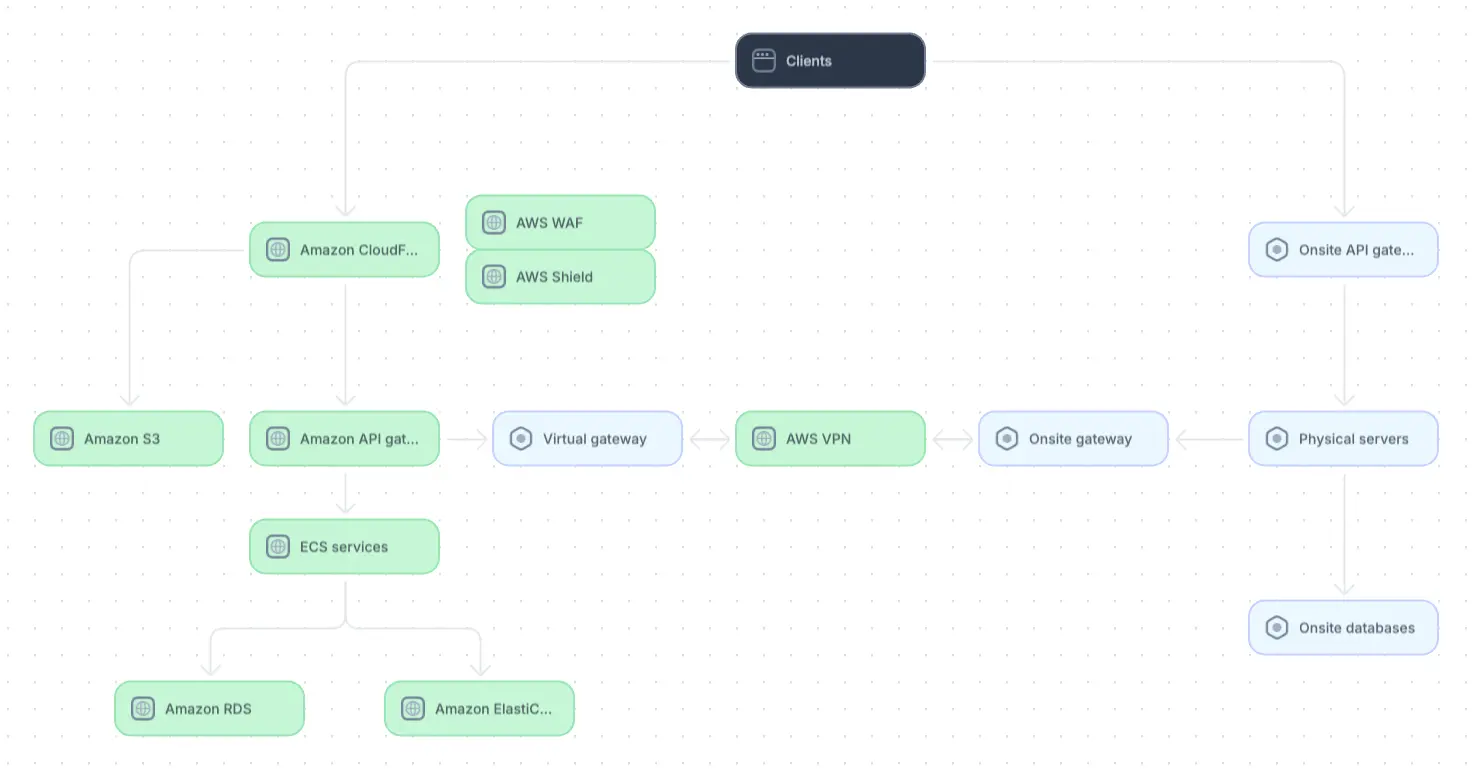
Example of a hybrid architecture diagram (adapted from source)
Application architecture diagram best practices
Effectively documenting the system architecture helps teams gain clarity into their system, simplifies onboarding, facilitates knowledge sharing, and boosts team productivity. While architecture diagrams will vary between cloud, onsite, and hybrid architectures, as discussed earlier, certain diagramming best practices hold true across different use cases.
In this section, we explore four such practices. By following these guidelines, you can consistently create and maintain diagrams that are clear and communicative for different stakeholders on each project.
Use standard notations and colors
Use standardized symbols and conventions in your architecture diagrams, ensuring that everyone on the team speaks the same visual language. This uniformity minimizes confusion, allowing stakeholders from different disciplines (such as developers, project managers, and executives) to interpret the diagrams accurately. Standardization also reduces the risk of misinterpretation during critical decision-making processes and improves overall collaboration.
Purposeful use of color in conjunction with other visual elements, such as labels, can enhance the readability of the architecture diagrams. Different colors can represent distinct layers of the application, types of components, or the states of the services.
One click. Full-stack visibility. All the data you need correlated in one session
RECORD A SESSION FOR FREETailor diagrams to the technical proficiency of their audience
One of the most common mistakes in architecture diagramming is either oversimplifying or overcomplicating diagrams. While developers may require detailed interactions and flows (e.g., API call sequences, message queues, or deployment topologies), business stakeholders are likely more interested in high-level overviews that illustrate how system components support core business capabilities. Create separate, purpose-driven diagrams for each audience so everyone can see the level of detail that matters most to them.
Multiplayer’s system dashboard supports this practice. Once it has automatically detected components and reverse-engineered your system, it allows you to create custom views of architecture diagrams that include different levels of detail. Developers can create views of detailed service interactions and see comprehensive information on each component, while business stakeholders can focus on high-level overviews of component relationships.
Document dependencies and integration points clearly
Architecture diagrams are most useful when they make explicit how components interact with each other and with external systems. Make sure dependencies, data flows, and integration points between services, APIs, databases, and third-party systems are clearly labeled. In addition, include information about synchronous versus asynchronous communication, expected latencies, and error-handling pathways where relevant. Doing so helps teams understand potential points of failure, plan for scaling, and troubleshoot issues more efficiently, while also making onboarding and cross-team collaboration easier.
Focus on real user flows
Architecture diagrams are most valuable when they reflect how the system actually behaves, not how it was intended to behave. Static or idealized diagrams often fail to capture the complexity introduced by real-world traffic patterns, architectural drift, and evolving dependencies. Ground your diagrams in recorded or observed data, such as live request paths, user interaction traces, and end-to-end transaction data that reveal how users and services actually communicate.
Implementing this practice hinges on having sufficient visibility into the underlying system. Without it, there is either not enough data to work from or so much data (e.g., from APM tools, logs, and trace systems) that it becomes impossible to stitch together how requests flow through your system.
Start by instrumenting your most critical services with an observability framework like OpenTelemetry to standardize how traces, metrics, and logs are generated, exported, and collected across your architecture. To extend visibility to the frontend, route telemetry data to a tool like Multiplayer’s full stack session recordings, which combine the visibility of OpenTelemetry with the rrweb library to provide developers with an end-to-end, correlated view of frontend screens, user actions, backend traces, metrics, logs, and full request/response content and headers.


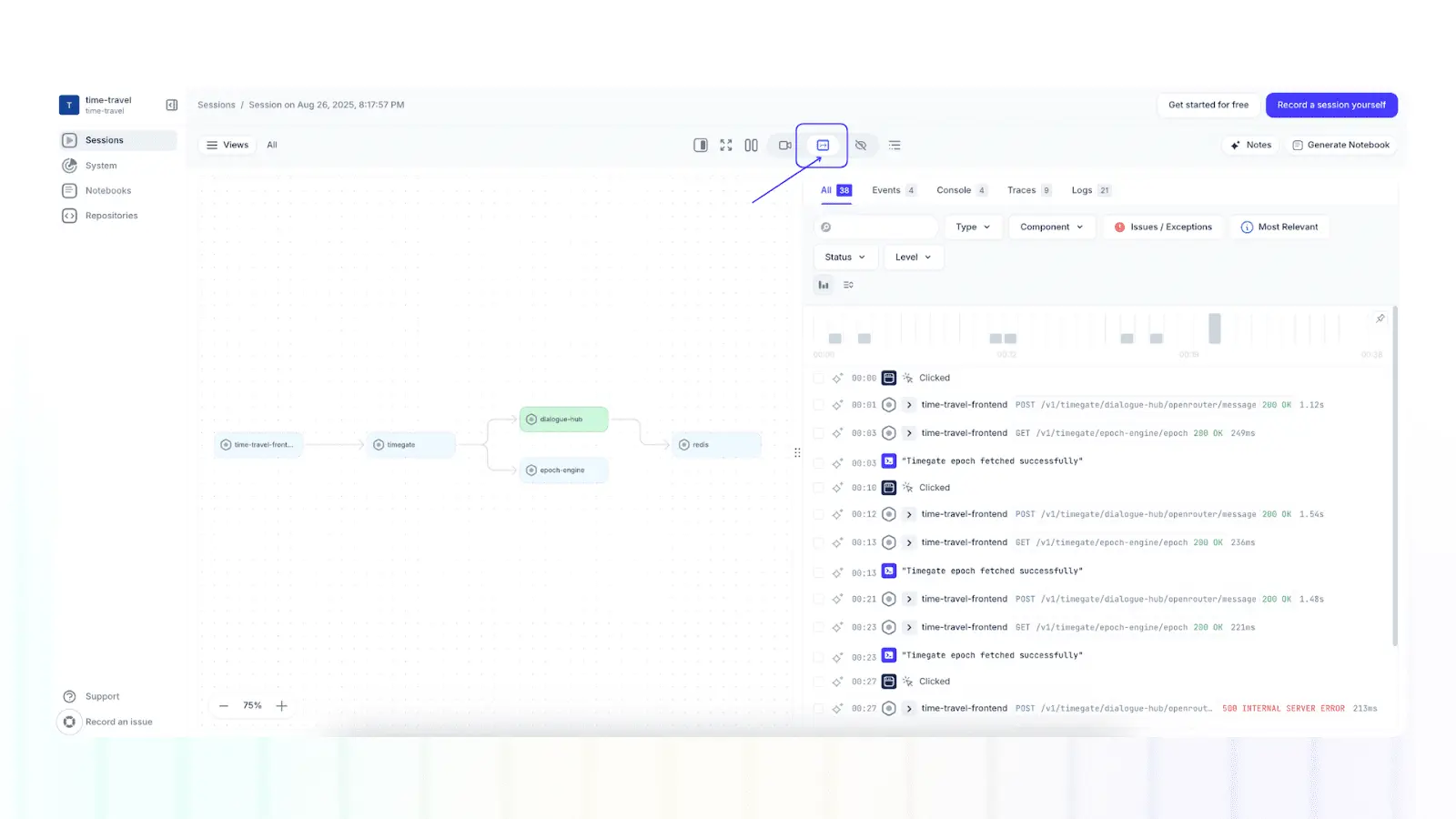
Multiplayer full stack session recordings
The result is a living architecture view that ties together the full stack. Teams can view a map of the system components and dependencies involved in a specific session recording, and they can use insights from recordings to ensure architecture diagrams remain up to date, actionable, and reflect real-world behavior.
Stop coaxing your copilot. Feed it correlated session data that’s enriched and AI-ready.
START FOR FREELast thoughts
In this article, we explored important considerations when choosing between cloud, onsite, and hybrid architectures, such as those related to cost, performance, and scalability. Regardless of the architecture type, it is important to create well-crafted diagrams that prioritize clarity, simplicity, and different levels of abstraction for different audiences. By effectively diagramming different types of system architectures, organizations can make informed decisions that align with their specific goals, ensuring optimal application performance and adaptability in a competitive environment.