Multiplayer is now open source
The Multiplayer debugging agent is open source under MIT. Here's why, and what it means for how you use it.

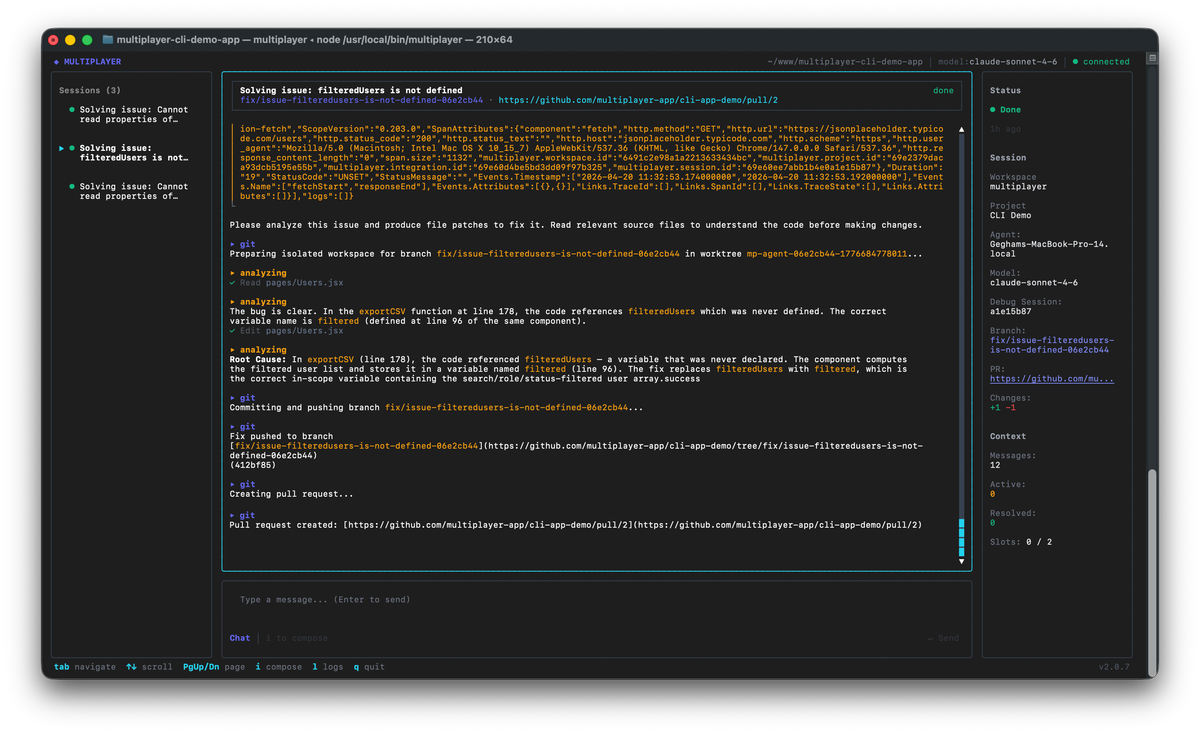
Today we're open sourcing the Multiplayer debugging agent: connect your favorite coding agent to prod to fix application bugs automatically. Run it locally and eliminate PR slop.
The core (session-based data capture, local-first architecture, intelligent deduplication, and coding agent integration) is publicly available under MIT, free to use, and auditable by anyone.
You can find it here: https://github.com/multiplayer-app/multiplayer
Why we believe in open source
Open source is under real stress right now: maintainers are burning out under floods of AI-generated pull requests, projects are shutting their doors, and SaaS companies are reverting to closed-source and declaring “open source is dead”. GitHub even had to ship maintainer-relief tools just to keep the contribution model functioning.
The structural problem is simple and brutal: AI coding tools dropped the cost of generating a pull request to near-zero, while the cost of reviewing one stayed exactly the same (our CTO and cofounder Thomas Johnson wrote in depth about the PR reviews crisis).
We made this decision with eyes open. Open sourcing Multiplayer means accepting some version of that reality. So why do it?
Because trust has to be earned, not assumed.
Multiplayer runs locally, next to your coding agent, and captures full-stack session data when something breaks in production. We're designed to minimize data exposure by default: we only capture full-stack session data when something goes wrong, and nothing gets sent anywhere until we've identified a new issue worth surfacing.
The open source core takes that further. When you self-host Multiplayer, nothing leaves your infrastructure, period. If your organization has policies that prevent sending production data to third-party services, or you simply want full control over where your data lives, self-hosting is the right model.
It also gives you the means to verify that Multiplayer works the way we describe it. The honest answer to "how do we know what this thing is actually doing?" is: read the code. Inspect the capture logic. Verify that data stays local until an issue is identified. Confirm that nothing gets sent anywhere until Multiplayer has found something worth surfacing.
Because open source is the best answer we have to the PR slop problem.
One of the major causes of the flood of low-quality AI contributions is the data problem. Agents generating pull requests without sufficient context about the system they're modifying produce plausible-looking code that crumbles under review and fails in production. The same mechanism that produces bad debugging fixes produces bad open source contributions: an agent working blind, guessing at what the system needs, generating output that looks right on the surface and fails in practice.
Making Multiplayer available to as many developers as possible is the most direct way we can address that. Better runtime data for coding agents means higher quality outputs, both in production debugging and across the whole AI coding workflow, including open source contributions. As models improve, as context engineering practices mature, and as developers get better at giving agents the right data to work from, the quality of AI-assisted contributions will follow. We're open sourcing because we believe that, and because we want to accelerate it.
There's also the security argument, which is straightforward: security through obscurity is not security. More eyes on the code (including AI-assisted eyes) is a net positive for security, not a liability. The right response to AI-powered vulnerability scanning is transparency and continuous improvement, not keeping the code closed and hoping nobody looks.
How it works: open core, hosted, and enterprise
We're launching with three tiers, and we want to be clear about what each one is and why.
Open source core (MIT)
Everything a developer needs to run Multiplayer locally is open source. Full-stack, unsampled session capture. Local-first architecture that caches sessions and only sends data when a new issue is identified (there is an error or exception in your frontend or backend). Intelligent deduplication so the same bug gets tracked once. Coding agent integration with Claude Code, (and coming soon) Codex, Copilot, Cursor, and whatever ships next.
Hosted plan
If you want to use Multiplayer without managing your own infrastructure, the hosted plan is the right option. We handle deployments, updates, maintenance, and uptime. The hosted plan includes SSO/SAML, 30-day session retention, and email support.
One thing worth being explicit about: Multiplayer is designed to minimize data exposure by default. We only capture full-stack session data when something goes wrong. Nothing gets sent anywhere until we've identified a new issue worth surfacing. The hosted plan gives you the convenience of a fully managed service without the broad data exposure that usually comes with SaaS tooling.
Enterprise features
Audit logs, compliance reporting, team management, and other features that only matter at scale are licensed commercially and separately from the open source core.
A note on contributions
We welcome contributions, and we want to be honest about what makes a good one.
The PR slop problem is real and we're not immune to it. The contributions that will move Multiplayer forward are the ones grounded in real runtime data: bug reports that come from developers who have actually run Multiplayer against a production system and hit a specific edge case. We're optimizing for signal, not PR volume.
The contributing guide is here: https://github.com/multiplayer-app/multiplayer/blob/main/CONTRIBUTING.md
If you're using Multiplayer and something is broken or missing, we want to hear from you.
Get started
The repo is here: https://github.com/multiplayer-app/multiplayer
The hosted plan is here: https://go.multiplayer.app/
The docs are here: https://www.multiplayer.app/docs/
Run it locally, for free👇