Guide
AI in Web Development: Tutorial & Examples
Table of Contents
Artificial intelligence is rapidly reshaping how web development teams build, debug, and maintain applications. Once limited to simple autocomplete suggestions, today’s AI coding assistants have become genuine collaborators that can generate boilerplate code, explain stack traces, summarize logs, and even draft technical documentation.
At the same time, engineers are learning that AI’s value depends on thoughtful oversight. Industry leaders describe these systems as “colleagues,” not replacements. AI assistants handle repetitive tasks, allowing developers to focus on higher-level work, such as system design decisions, system architecture, and performance optimization.
This article will explore how AI in web development is changing the industry in five key areas: code generation, debugging, feature planning, documentation, and performance optimization. It also outlines the practices that help teams use AI tools responsibly and effectively.
Summary of use cases for AI in web development
The table below summarizes the five AI web development use cases this article will explore.
| Use cases | Description |
|---|---|
| Code generation and completion | AI tools automate code generation and completion to reduce development time and effort. |
| Debugging and error detection | AI tools help identify and resolve bugs faster by analyzing code, session data, and logs. |
| Feature development | AI tools analyze session data, usage patterns, and code structures to help engineers plan and develop new features. |
| AI-driven documentation generation | AI can automate the creation of executable (runnable) and precise documentation, bridging the gap between code and documentation. |
| Performance monitoring and optimization | AI tools analyze application performance, identify bottlenecks, and recommend optimizations to enhance efficiency. |
Context for AI in web development
The rapid rise of AI in web development reflects a broader shift in how software teams approach productivity. Over the past two years, AI tools have moved from experimental side projects to everyday essentials for frontend, backend, and full-stack developers. Adoption has grown quickly. A 2025 Stack Overflow survey found that 84% of developers now use or plan to use AI coding tools, up from 76% the previous year. Most rely on them for code generation (82%), debugging (57%), and documentation (40%), showing how deeply these tools have entered the modern workflow.
For many teams, these tools have become a primary source of support when starting new features or investigating complex bugs. Developers describe them as digital collaborators that remove routine toil and make coding more fluid, particularly for tasks such as generating boilerplate, building APIs, or summarizing server logs.
However, the same qualities that make AI appealing also introduce new risks. Models trained on public data can generate plausible but incorrect code, sometimes inventing functions or dependencies that do not exist. Studies have found that a large percentage of AI-generated snippets contain subtle errors, hallucinated calls, or security vulnerabilities, leading to wasted debugging time and security concerns. As a result, less than one-third of developers fully trust AI output, and many organizations still hesitate to use these tools in production without strict review policies.
Because of these issues, the most successful teams combine AI with human oversight. They use AI to draft and analyze, but rely on engineers to verify, refine, and decide what reaches production. This partnership between speed and scrutiny is shaping the next phase of web development, one where AI accelerates progress without replacing the judgment and accountability required for high-quality software engineering.
Top five use cases for AI in web development
In the sections that follow, we’ll look at how developers are applying AI in five major areas of their workflows. Each represents a practical example of how AI can accelerate development while still depending on human review to ensure accuracy and reliability.
Code generation and completion
AI tools like GitHub Copilot and other code assistants have redefined how developers write code. Instead of manually typing every line, engineers can now describe an intent in plain language and let the assistant suggest a function, class, or even an entire module. This capability has turned the IDE into an active collaborator, reducing the time spent on repetitive tasks such as scaffolding endpoints or writing data models.
In practice, developers rely on these tools to complete partially written snippets, fill in boilerplate code, and offer context-aware suggestions during implementation. For example, a developer might start a simple Node Express route:
// Prompted starter
app.post('/users', async (req, res) => {
  // create user here
});
An AI assistant could then expand it to:
app.post('/users', async (req, res) => {
  const user = await db.createUser(req.body);
  res.status(201).json(user);
});
This works, but it is not quite safe. A quick human review would reveal missing validation and error handling. The corrected version might look like:
app.post('/users', async (req, res) => {
  try {
    const { name, email } = req.body ?? {};
    if (typeof name !== 'string' || typeof email !== 'string') {
      return res.status(400).json({ error: 'Invalid or missing fields' });
    }
    const user = await db.createUser({ name, email });
    return res.status(201).json(user);
  } catch (err) {
    console.error('Create user failed:', err);
    return res.status(500).json({ error: 'Internal Server Error' });
  }
});
This simple example illustrates the core dynamic: AI accelerates the first draft, but developers still need to ensure correctness, security, and maintainability.
Full-stack session recording
Learn more






Debugging and error detection
Debugging has always been one of the most time-consuming parts of development. Engineers sift through logs, stack traces, and user reports, trying to find where a failure began. AI tools can ease this burden by analyzing vast volumes of telemetry and suggesting likely causes. Instead of manually reading through pages of logs, a developer can paste an error trace into an assistant and get a concise explanation and suggested fix within seconds.
For instance, when investigating a frontend latency spike, an AI assistant might analyze logs and suggest that the root cause lies in an unoptimized database query:
SELECT * FROM orders WHERE user_id = ?;The assistant may recommend adding an index to the user_id column, which helps but doesn’t address higher-level performance factors such as redundant queries or caching.
Full-stack visibility strengthens this process. For example, with Multiplayer’s full stack session recordings, teams can capture the exact sequence of frontend and backend events that led to an error–including network calls, console logs, and trace spans–and feed this data to AI coding tools. For the latency issue above, rather than simply adding an index to the user_id column and hoping it fixes the problem, a developer can pinpoint where latency first appears in the timeline (for example, during a specific API call) and correlate it with backend traces to confirm whether the slowdown originates from the database or the network layer.


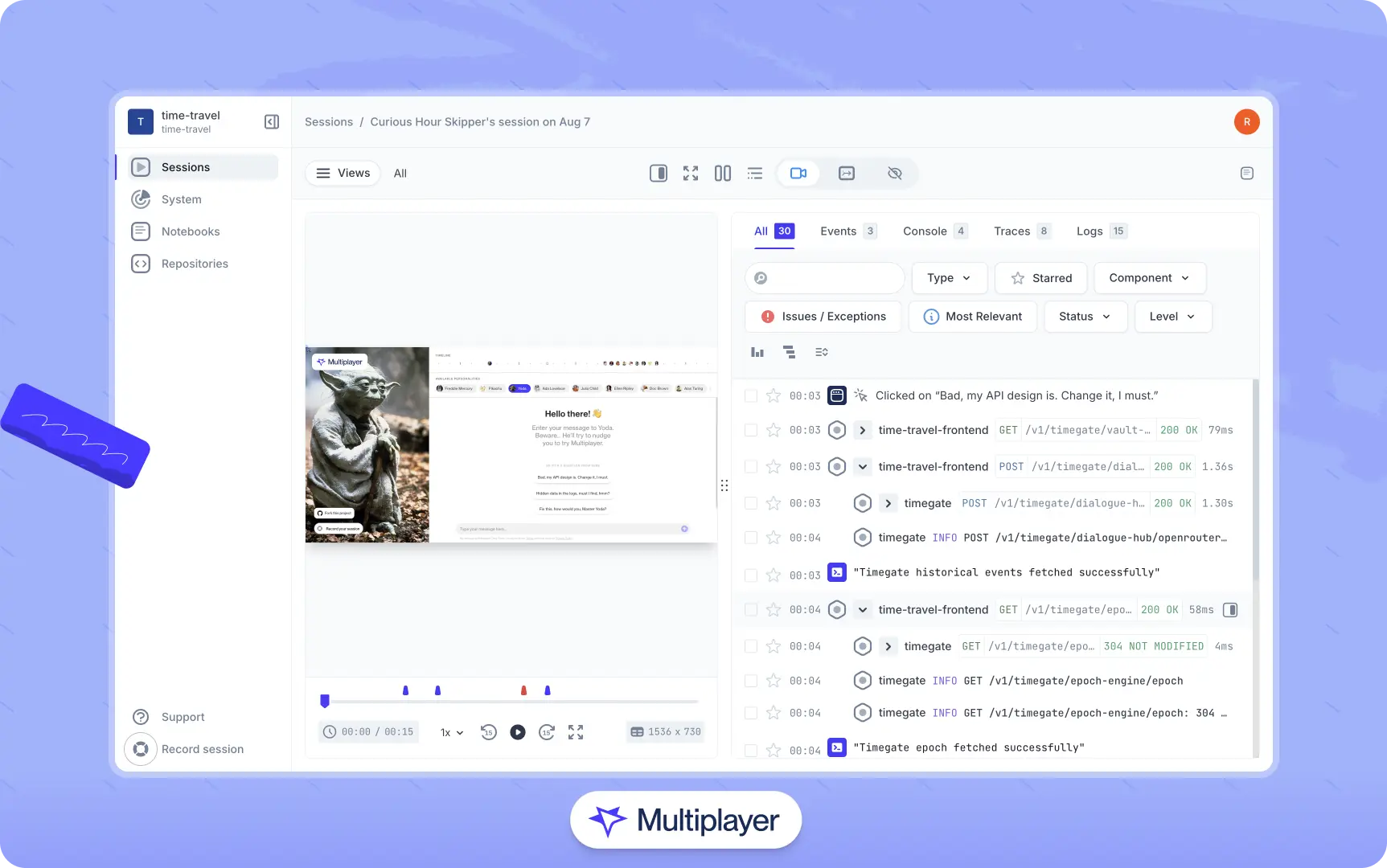
Multiplayer full stack session recordings
In practice, the most reliable workflow combines AI-assisted analysis with concrete evidence from session replays and observability data. Let the model surface hypotheses quickly, then validate them with session recordings, existing test suites, and human review.
Feature development and planning
AI is also changing how product and engineering teams plan and prioritize new features. Beyond helping to write code, AI can analyze user feedback, issue trackers, and session recordings to identify patterns that indicate potential areas for improvement. Product managers and developers can use these insights to understand where users struggle, which workflows are most common, and which parts of the application cause friction. In many cases, AI can group related user reports or detect repetitive feature requests that would otherwise go unnoticed in a large backlog.
A typical feature planning workflow might involve feeding anonymized user sessions, support tickets, or analytics data into an AI clustering tool. The tool highlights the most common user actions, flags drop-off points, or correlates customer complaints with specific modules. Teams then use these insights to refine existing features or prioritize new ones.
AI can also help validate new features once they reach a staging environment. Instead of relying exclusively on manual QA passes or automated tests, teams can feed real or synthetic user flows into the staged build and let an AI model call out broken paths, unexpected state transitions, or subtle regressions.
However, once again, human interpretation remains essential. AI tools can rank or suggest changes based on frequency or engagement metrics, but cannot fully grasp business priorities, long-term strategy, or nuanced user needs. Developers and product leads must carefully review AI insights to ensure that suggestions are both correct and align with the product vision and technical feasibility.
In other words, use AI as a discovery and analysis aid, not a decision-maker. Let it handle data aggregation, clustering, and trend detection, but rely on human judgment to prioritize tasks and determine what to build next.
Interact with full-stack session recordings to appreciate how they can help with debugging
EXPLORE THE SANDBOX(NO FORMS)
AI-driven documentation generation
Keeping documentation up to date is one of the most time-consuming aspects of maintaining software. As code evolves, README files, API references, and setup guides often fall behind. AI tools can help bridge this gap by automatically generating and updating documentation. They can scan codebases, interpret function signatures, and even produce executable guides that capture integration behavior.
For example, once a developer commits new code, an AI assistant can generate docstrings and endpoint summaries from the diffs. When introducing a new API route, a tool like GitHub Copilot or Cody might produce:
AI-generated docstring
def get_user(user_id):
    """Returns user details."""
    ...
This is technically correct, but far too vague. Developers reviewing this version should alter the docstring to capture behavior and constraints:
def get_user(user_id: str) -> dict:
    """
    Retrieve user details by ID.

    Args:
        user_id (str): UUID of the user.

    Returns:
        dict: Basic profile info (name, email, status).

    Raises:
        ValueError: If the ID format is invalid.
    """
Other forms of documentation
Docstrings, however, are only one layer of documentation. To understand why systems are designed and behave the way they do, teams also need architectural decision records (ADRs), API call examples, setup instructions, and design rationales that connect implementation details to higher-level intent.
A common solution is to store these artifacts across multiple tools (wikis, API clients, code comments, etc.). Teams may use AI to assist in creating them, but the core problem remains that developers still must navigate different resources to find the information they need.
To alleviate this issue, teams can use tools like Multiplayer notebooks to generate documentation that combines enriched text, live API calls, and executable code snippets into a single workspace. For example, a notebook might capture a short API sequence that creates a return order:


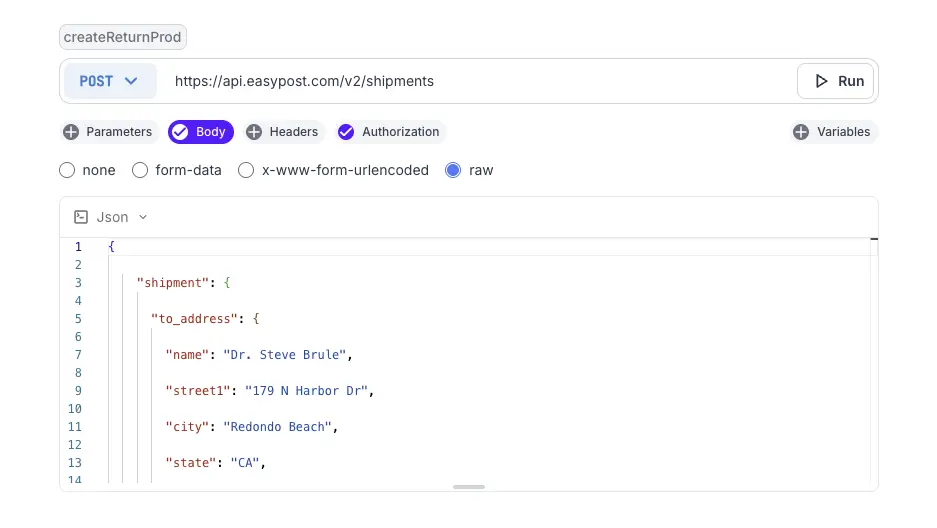
Then uses the result of that API call to verify that the rates in their testing and production environments are consistent to ensure there is no unintentional environmental drift:


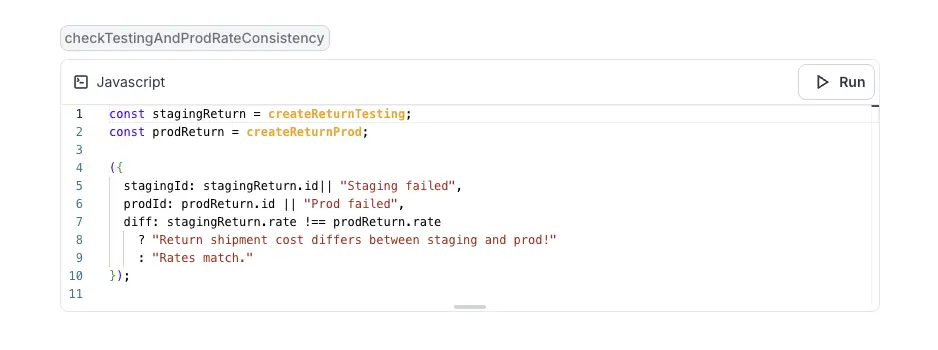
When replayed, each step executes against the same backend context, showing live responses and output differences inline.
Notebooks can be written manually, generated from natural language with AI assistance, or automatically generated from full stack session recordings. Human review is still necessary. However, because notebooks directly validate what they describe, much of the verification is built in: engineers can execute each API call or code block within the documentation to confirm that it accurately captures system behavior and remains current as the system evolves.
One click. Full-stack visibility. All the data you need correlated in one session
RECORD A SESSION FOR FREEPerformance monitoring and optimization
Performance optimization has long been one of the most complex and specialized areas of web development. Identifying why an application slows down or consumes too many resources often requires deep domain expertise and painstaking profiling. AI tools are now helping developers automate much of that work. They analyze logs, metrics, and code to flag bottlenecks such as inefficient loops, excessive memory allocation, or slow database queries.
For example, an AI-powered system can continuously monitor runtime data from production services. It can detect anomalies, such as sudden increases in response time or CPU usage, and generate reports pinpointing potential causes. Some advanced systems, like Uber’s PerfInsights, even scan the source code of the hot paths to suggest specific improvements, such as preallocating data structures or optimizing string handling. Developers then evaluate these suggestions and apply the fixes they consider appropriate.
The risk is that AI optimizers are not always reliable. They can detect patterns but often generate “fixes” or false positives that are unsafe to apply directly. In addition, they cannot always understand architectural trade-offs, resource constraints, or system-level implications.
Engineers must therefore validate every suggestion through benchmarking and code review before deploying changes. Use AI as a diagnostic and discovery tool rather than an autonomous fixer. Let it identify inefficiencies and propose hypotheses, then test and validate those insights with profiling tools and real-world workloads.
Finally, combine AI monitoring with human-led benchmarking and architectural review to ensure optimizations improve both performance and reliability. When applied in this way, AI helps teams achieve meaningful gains, shorter response times, reduced resource usage, and more efficient scaling without compromising system stability.
Practical limitations of AI in web development
As we have seen, AI tools are helpful–though imperfect–tools to use when developing software. To mitigate the risks of using AI tools, developers should treat their output as a starting point rather than a final product.
However, even as AI capabilities improve, many of the productivity gains they promise remain constrained by organizational bottlenecks or by how teams work together. Typical examples include:
- Slow review cycles
- Unclear ownership boundaries
- Siloed workflows
- A lack of shared coding standards,
- Insufficient documentation
Without well-defined collaboration processes, AI suggestions can create friction, reviewers may distrust the code, and ownership over fixes can become ambiguous. An AI model might help individual developers write code more quickly, but if that code sits in a pull request queue for days or breaks integration tests that no one owns, the net result is still a delay.
Addressing these challenges and improving internal development processes is just as important as choosing the right AI platform. Some practices that can help are:
- Defining explicit review guidelines for AI-generated code
- Standardizing documentation practices across teams
- Aligning engineering groups around shared quality metrics and definitions of “done”
Tools like Multiplayer can also help by making collaboration and visibility part of everyday development. Its system dashboard gives teams a shared view of how services and ownership boundaries connect. Notebooks make documentation more comprehensive by allowing engineers to combine API calls, code snippets, and step-by-step instructions in one place. Finally, full-stack session recordings reduce siloed troubleshooting by replaying how real users interact with the system.
Stop coaxing your copilot. Feed it correlated session data that’s enriched and AI-ready.
START FOR FREEConclusion
AI has become an indispensable part of modern web development by automating many of the more tedious and repetitive aspects of writing software. However, its greatest value lies in its pairing with human oversight and transparent workflows. Developers must validate AI outputs, teams still need strong review practices, and organizations still depend on shared visibility across the stack. Platforms like Multiplayer bring these elements together by combining AI assistance with full-stack session replays and executable documentation. The future of development isn’t AI replacing engineers; it’s AI amplifying how engineers design, debug, and deliver reliable software.