[Part 4] Developer onboarding: documentation must-haves
A full list of all the technical documentation a newly hired engineer will need to ramp up and become productive.

![[Part 4] Developer onboarding: documentation must-haves](https://www.multiplayer.app/blog/content/images/size/w1200/2025/11/dev-onboarding-2.png)
When a new person joins your team, everything comes at them all at once: new projects, processes, tools, technologies, and codebase. In this blog post series we talk about the best strategies that can transform a potentially overwhelming transition into a seamless and productive journey.
(1) Improving your developer onboarding approach
(2) Developer onboarding: best practices
(3) Developer onboarding: smart habits
(4) Developer onboarding: documentation must-haves
(5) Developer onboarding: documentation common mistakes
In 2017 the story of a young developer who accidentally destroyed a production database became viral on Reddit. In less than 24 hours it had received 28k upvotes and 4,2k comments with a stunning display of support and sympathy from the tech industry.
What jumps out to me, however, is how badly the onboarding process failed this young engineer: the reason why they crashed the entire production database is because they followed misleading instructions in an onboarding document on how to set up their local dev environment.
Although this is an extreme example, the onboarding process has a significant impact on new hire retention and productivity: many companies lose up to 25% of their employees in the first year and the ones that stay, have a long ramp-up period (8 to 12 months) before they are fully productive.
A well-planned onboarding process can raise the retention of new hires by 82%, while increasing their productivity by 50% or more.
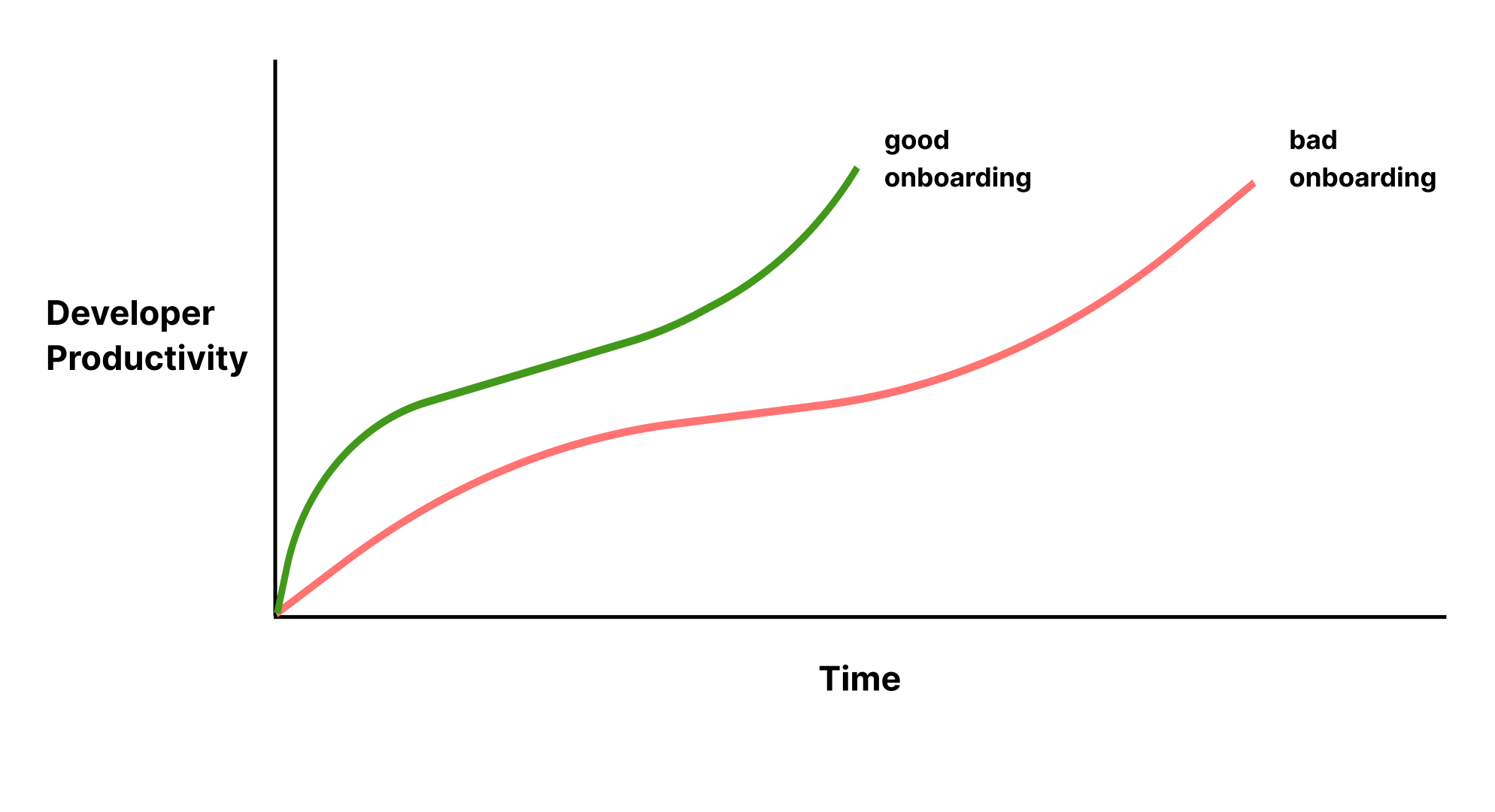
Whether you have a highly structured onboarding process or a self-study approach, your newly hired engineer will need the following bare minimum set of documents to ramp up as autonomously as possible and minimize the amount of impact on the rest of the engineering team.
As a note, the onboarding process is much more than just mastering technical proficiency, it also encompasses learning how to communicate and collaborate with your new team. Check the other posts in this series for a complete walk through of onboarding best practices.
Environment setup guide
Software engineers can't start building without a properly configured local development environment, including installing the necessary software, configuring IDEs, setting up version control, and connecting to relevant databases or services.
Without step-by-step instructions (ideally standardized for the entire team), new engineers can waste days trying to set up that local dev environment correctly… and in the very worst case scenario, with incorrect setup instructions, they can even blow up the entire production database!
While an "Environment setup" guide is helpful, equally so is adopting infrastructure-as-code approaches:
- Development containers (devcontainers) that provide consistent, reproducible environments
- Cloud development environments (GitHub Codespaces, Gitpod) that eliminate local setup entirely
- Automated setup scripts that handle dependencies, credentials, and configurations programmatically
System architecture documentation
A system architecture overview is a crucial tool for communicating the high-level design and rationale of a software system. Many teams make the mistake of subscribing to the belief that "the code documents the system."
However, that leaves them with only half a story: for all stakeholders, developers, and maintainers to understand the structure, behavior, and quality attributes of the system, you need to know the history behind architectural decisions and how different parts of the system relate to each other.
Diagrams are also a key part of a system architecture document: they provide a way to understand and explain complex systems and processes at a glance, facilitating collaboration especially with non-technical stakeholders.
Key features of effective architecture documentation:
- Stays current with your codebase, ideally automatically without the need to manually create or update diagrams (which is a loosing proposition for complex systems).
- Accurately displays the different layers of distributed systems (e.g. client, load balancer, API, web server, application server, caching, CDN, database, etc.), the relationships between components and their dependencies
- Includes the "why" behind decisions, not just the "what": architectural decision records (ADRs) are invaluable for understanding system evolution
Having all this information in a single, easy-to-navigate, always up-to-date location ensures a quicker time-to-productivity for new engineers.
Tech stack documentation
List all the technologies, programming languages, frameworks, libraries, and databases used by the team. Beyond just listing tools, provide context:
- Why these technologies were chosen (performance? team expertise? ecosystem?)
- Version constraints and upgrade policies
- Known limitations or gotchas
- Learning resources specific to how your team uses these technologies
Codebase documentation
This document should describe:
- The overall structure of the codebase (including directories, modules, and key files)
- The naming conventions used for files, directories, classes, and variables
- The database schema (including tables, relationships, and key fields)
- The data models used in the application, along with their attributes and relationships
- Code ownership and which teams are responsible for which services or modules
- Common patterns used throughout the codebase (how you handle errors, manage state, structure components, etc.)
API documentation
Similar to the system architecture documentation, comprehensive API documentation should include:
- Complete documentation for endpoints, request/response formats, and authentication mechanisms
- Examples of API usage and common use cases
- Rate limits, error codes, and how to handle them
- Webhook configurations and event schemas (if applicable)
Modern API documentation tools should provide you with an interactive sandbox environment to model complex integrations, which requires chaining together multiple APIs and code blocks, in addition to adding explanations and data visualizations. Here are a few examples:
- example-1-authentication-using-reqres: An example notebook using reqres API
- example-2-internal-api-wiremock: An example notebook of an internal API mocked using WireMock
- example-3-shipping-easypost-api: An example notebook using EasyPost API
Technical processes documentation
While more senior engineers may know how to jump straight from a simple, written task into the building of core business logic, that might not be true for more junior engineers or those not familiar with the team's domain yet. Ultimately, helping new engineers gain familiarity with both business logic and development best practices, allows for a quicker ramp up.
The technical processes documentation aims to introduce the software development methodology and outline the following processes:
Development workflow:
- Branching strategy and code review process
- Coding standards and linting/formatting configurations
- How to run tests locally and what's expected before submitting PRs
- CI/CD pipeline overview and how to interpret build results
Deployment process:
- How deployments work for various environments (dev, staging, production)
- Who can deploy what and when
- Rollback procedures and incident response protocols
- Feature flag usage and experimentation practices
Testing strategy:
- Types of tests used (unit, integration, end-to-end) and when to write each
- Test coverage expectations
- How to run and write tests in the team's specific frameworks
Security best practices:
- Authentication and authorization mechanisms
- How to handle secrets and credentials
- Common security vulnerabilities to avoid in your tech stack
- Security review and compliance requirements
Debugging & observability documentation
One often-overlooked but critical piece of documentation is a guide to your debugging and observability setup. New engineers need to know:
What tools are available:
- Logging platforms and how to query them effectively
- APM (Application Performance Monitoring) tools and key dashboards
- Session recording systems that capture user interactions and backend behavior
- Error tracking and alerting configurations
How to investigate issues:
- Where to start when a bug is reported
- Common investigation workflows used by the team
- How to correlate frontend errors with backend logs
- When to use which tool for different types of problems
Real-world examples: Provide access to past incident investigations, including the investigative process. When new engineers can review how experienced teammates diagnosed tricky bugs, they build debugging intuition much faster. Full stack session recordings are particularly valuable here, allowing new hires to replay actual user sessions and see exactly what happened during past incidents, effectively learning from real scenarios without the pressure of live production issues.
Run it locally, for free👇